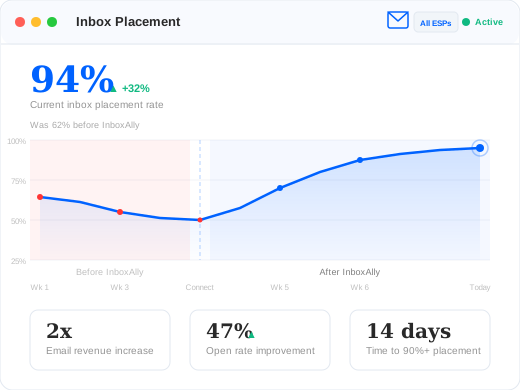
The only deliverability tool that works with any email platform. Add seed contacts to your ESP in minutes — they generate the engagement signals that rebuild mailbox provider trust. Average 32% inbox placement improvement within 14 days.
✓ No credit card required · ✓ Cancel anytime · ⭐ 4.8/5 on G2
At a Glance
InboxAlly fixes email deliverability for any email platform by generating positive engagement signals that train Gmail, Outlook, and Yahoo to trust your sending domain. Works with Klaviyo, HubSpot, Mailchimp, ActiveCampaign, and any ESP that supports list-based sending. Most users see measurable inbox placement improvement within one to two weeks.
Whether you send 5,000 emails a month or 5 million, InboxAlly works with your existing email infrastructure. Email senders lose an estimated 30-40% of revenue when emails land in spam. InboxAlly fixes this by placing seed contacts in your email platform that generate the engagement signals mailbox providers need to trust your sending domain.
Stop Your Emails Landing in Spam
The only deliverability tool that works with any email platform. Add seed contacts to your ESP in minutes — they generate the engagement signals that rebuild mailbox provider trust. Average 32% inbox placement improvement within 14 days.
InboxAlly works with any email platform that supports list-based sending. Setup takes under 5 minutes: add your seed contacts to your ESP and start sending. That’s it.
Every setup delivers the same result. However seeds get into your platform, InboxAlly’s engagement signals work identically. The deliverability improvement is the same regardless of which ESP you use.
Why Are Your Emails Underperforming?
Even the best email content fails when mailbox providers don’t trust your domain. These are the most common deliverability problems email senders face.
Campaigns Landing in Spam or Promotions
Without InboxAlly: Your carefully designed campaigns end up in the spam folder or Gmail’s Promotions tab. Subscribers never see them, open rates drop, and revenue from email stalls.
With InboxAlly: Seed contacts in your account generate consistent positive engagement signals. Mailbox providers learn to trust your domain and route your campaigns to the primary inbox. Typical result: Primary inbox placement within 2 weeks.
Declining Open Rates as You Scale
Without InboxAlly: As your list grows, you add subscribers who don’t engage. Your sender reputation drops, and even your most loyal subscribers stop seeing your emails.
With InboxAlly: Automated seed engagement counterbalances inactive subscribers, maintaining your sender reputation as your list scales. Open rates stay consistent even as you grow. Typical result: Stable open rates through 3x list growth.
New Domain or IP Warmup
Without InboxAlly: Starting a new domain or moving to a new IP? Without established reputation, mailbox providers default to spam filtering. Low volume plus no history equals automatic suspicion.
With InboxAlly: InboxAlly seeds warm your domain from day one. Consistent engagement signals build trust before you scale. Your domain earns credibility with Gmail, Outlook, and Yahoo from the first send. Typical result: Safe warmup to full volume in 2-3 weeks.
ESP Migration Without Losing Deliverability
Without InboxAlly: Switching platforms? Migration often resets your sender reputation. New IPs, new authentication, new sending infrastructure — reputation starts over from scratch.
With InboxAlly: Because InboxAlly builds domain-level reputation (not IP-level), your trust carries across ESP migrations. Seed engagement maintains positive signals through the transition. Typical result: Zero deliverability drop during migration.
Your ESP Reports Problems But Can’t Fix Them
Without InboxAlly: Your ESP dashboard shows declining open rates and rising bounce rates, but offers no way to actively repair your sender reputation. You’re left with vague advice like “clean your list” and “improve your content.”
With InboxAlly: Instead of just reporting problems, InboxAlly actively fixes them by generating the engagement signals that rebuild mailbox provider trust. Real opens, reads, and clicks from seed contacts — not suggestions, but action. Typical result: Reputation recovery within 2-3 weeks.
How InboxAlly Improves Your Deliverability
Seed Contact Validation
InboxAlly validates seed email addresses to ensure they’re active and deliverable. Bad addresses are flagged before they can damage your sender reputation, keeping your engagement signals clean.
Seed Setup in Minutes
Add InboxAlly’s seed contacts to your email platform and start sending — setup takes under 5 minutes. Grab your seed list from the InboxAlly dashboard, import it into your ESP, and you’re done. Some platforms like Klaviyo and HubSpot also offer one-click setup if you prefer, but the results are identical either way.
Engagement Monitoring and Reporting
Track how your seed emails perform with detailed metrics on engagement activity, validation rates, and inbox placement. Your InboxAlly dashboard shows you exactly how your deliverability is improving.
Fresh Seeds, Continuous Results
Keep your engagement signals strong by periodically refreshing your seed contacts. InboxAlly rotates seed addresses on a configurable schedule — just update your seed list when notified. For platforms with one-click setup, this happens automatically. Fresh seeds mean fresh engagement data, giving mailbox providers an ongoing stream of positive signals.
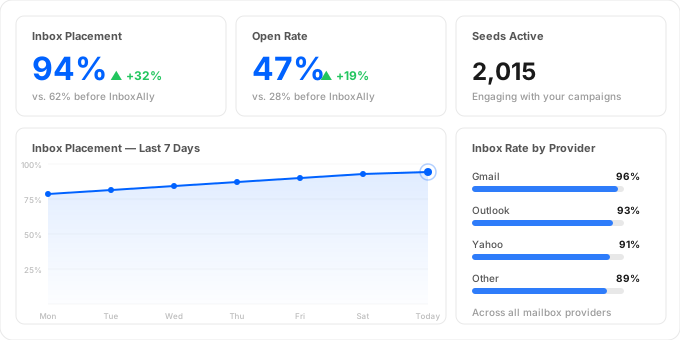
Track inbox placement, open rates, and seed engagement across every mailbox provider — all from your InboxAlly dashboard.
How It Works: Add Seeds, Send, Improve
Getting started takes less than five minutes, on any email platform.
Step 1: Add Seeds to Your Platform
Download your seed addresses from your InboxAlly dashboard and add them to your ESP as contacts — just like importing any subscriber list. For Klaviyo, HubSpot, and a few other platforms, you can also use one-click setup. Either way, you’re done in under 5 minutes.
Step 2: Seeds Join Your Sends
Once seeds are in your platform, include them in your regular email sends — add them to your sending lists or segments. They receive your actual campaigns, sequences, and automations — not artificial test emails.
Step 3: Your Deliverability Improves
As your campaigns send to InboxAlly seeds, those seeds generate positive engagement signals — opens, reads, and clicks. Mailbox providers see this engagement and start placing more of your emails in the inbox. Most users see measurable improvement within the first two weeks.
How InboxAlly Improves Your Deliverability
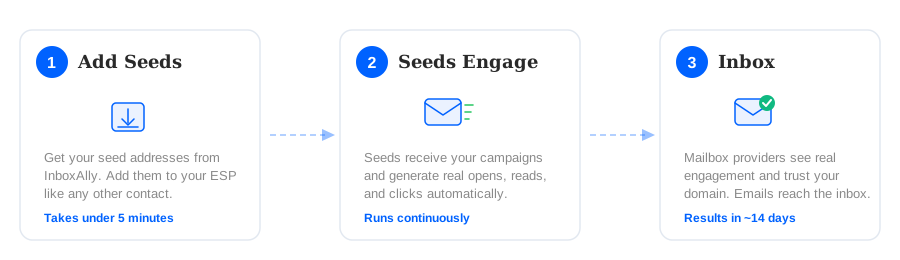
InboxAlly follows a three-step process that works with any email platform.
Add seeds, send your campaigns, and watch deliverability improve.
1. Get your seed addresses from InboxAlly and add them to your email platform like any other contact. 2. Seeds receive your campaigns and generate real opens, reads, and clicks automatically. 3. Mailbox providers see the engagement, trust your domain, and place more of your emails in the inbox.
Works With Any Email Platform — No Integration Required
InboxAlly doesn’t need an API connection to improve your deliverability. Here’s how it works with any ESP:
Get your seed list — Log into InboxAlly and download your seed email addresses (or copy them from your dashboard).
Add seeds to your platform — Import the seed addresses into your ESP as contacts, just like adding any subscriber. Add them to your sending lists or segments.
Send as normal — Include seed contacts in your regular campaigns, flows, or sequences. No special configuration needed.
InboxAlly engages — Our seed inboxes automatically open, read, and interact with your emails. Mailbox providers see this engagement and learn to trust your sending domain.
The result is identical no matter which ESP you use. InboxAlly’s engagement signals work at the mailbox provider level — Gmail, Outlook, and Yahoo don’t know or care how the seeds got into your list.
Why InboxAlly, Not Other Warmup Tools?
Unlike generic email warmup services, InboxAlly seeds live inside your email platform as real contacts. Seeds receive your actual campaigns and automations — not artificial test emails sent between warmup accounts. This means mailbox providers see genuine engagement patterns tied to your real sending domain and content.
Most warmup tools only work with cold email and SMTP. InboxAlly is built for marketing ESPs — the platforms where deliverability matters most for revenue.
What Email Senders Say About InboxAlly
“We were losing nearly half our email revenue to spam filtering. Two weeks after connecting InboxAlly, inbox placement jumped from 61% to 93%. The ROI is immediate and measurable.”
— Rachel Torres, Director of E-commerce, DTC home goods brand (200K subscribers)
“Our sales sequences were hitting spam across three different ESPs. InboxAlly fixed all of them. Domain reputation is the lever that matters, and InboxAlly is the best tool for building it.”
— James Whitfield, VP of Revenue Operations, B2B SaaS company (45K contacts)
“We run campaigns across SendGrid, SparkPost, and Amazon SES for 12 clients. InboxAlly works across all of them with the same simple seed import. No per-platform integration headaches.”
— Chris Lawson, Director of Email Operations, Full-service email agency
Guides for Your Platform
Looking for setup instructions specific to your email platform? We’ve built detailed guides for the most popular ESPs.
Emails land in spam when mailbox providers like Gmail, Outlook, or Yahoo don’t trust your sending domain. Common causes include low engagement rates, sending to unengaged subscribers, poor list hygiene, and lack of authentication (SPF, DKIM, DMARC). InboxAlly fixes the root cause by generating positive engagement signals that rebuild mailbox provider trust in your domain.
How do I improve email deliverability?
Start by authenticating your domain (SPF, DKIM, DMARC), cleaning your list, and segmenting by engagement. For faster and more reliable results, use InboxAlly to generate automated seed engagement that directly improves how mailbox providers score your domain. Most users see inbox placement improve within one to two weeks.
What is email warmup and how does it work?
Email warmup is the process of building sender reputation by gradually increasing sending volume and generating positive engagement signals. InboxAlly automates this by placing seed contacts in your email platform. These seeds receive your actual campaigns, open and read them, and click links — signaling to Gmail, Outlook, and Yahoo that your emails are wanted.
Does InboxAlly work with my email platform?
Yes — InboxAlly works with every email platform that supports list-based sending. Download your seed addresses from InboxAlly and import them as contacts. That works on SendGrid, Amazon SES, SparkPost, Postmark, Salesforce Marketing Cloud, and every other platform. Klaviyo, HubSpot, and a few others also offer one-click setup if you prefer. The engagement signals and deliverability results are identical regardless of setup method.
How long does it take to fix deliverability?
Most InboxAlly users see measurable improvement in inbox placement within one to two weeks. The timeline depends on your current sender reputation, sending volume, and the severity of your deliverability issues. Domains with moderate reputation problems often see results within days, while severely damaged reputations may take three to four weeks of consistent seed engagement.
What’s the difference between IP and domain reputation?
IP reputation is tied to the server or IP address your emails are sent from. Domain reputation is tied to your sending domain (e.g., yourbrand.com). Mailbox providers increasingly weight domain reputation over IP reputation, which means your deliverability follows your domain across IP changes and ESP migrations. InboxAlly builds domain-level trust, which is more durable and portable than IP reputation alone.
How much does InboxAlly cost?
InboxAlly pricing is based on the number of seed emails in your plan, not on which email platform you use. InboxAlly works with every ESP at no additional cost — there are no per-platform fees regardless of how you set up. Visit inboxally.com/pricing for current plan details, or book a demo to discuss which plan fits your sending volume.
Every day your emails land in spam is a day of lost revenue and missed engagement. InboxAlly works with any email platform and starts improving your deliverability in minutes.