✓ No credit card required · ✓ Cancel anytime · ⭐ 4.8/5 on G2
At a Glance
InboxAlly fixes HubSpot email deliverability by syncing seed contacts into your account and generating positive engagement signals that build domain-level trust with Gmail, Outlook, and Yahoo. Most users see measurable inbox placement improvement within one to two weeks.
B2B teams lose an estimated 30-40% of email-driven pipeline when HubSpot emails land in spam. InboxAlly fixes this by syncing seed contacts into your HubSpot account, training mailbox providers to trust your sending domain and place your marketing emails where contacts will see them.
Fix HubSpot Emails Going to Spam
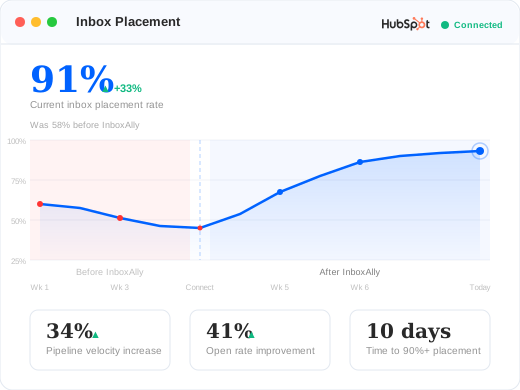
The only deliverability tool that syncs directly into HubSpot as real contacts. Your seeds receive your actual marketing emails — not artificial test emails. Average 32% inbox placement improvement within 14 days.
HubSpot is a CRM-first platform with email as a secondary capability. That architecture creates specific deliverability challenges that CRM features alone can’t solve.
Shared IP Reputation Risks
Without InboxAlly: HubSpot sends your marketing emails from shared IP pools. If other senders on those IPs have poor practices, your deliverability suffers – even if your own list hygiene is perfect.
With InboxAlly: Seed engagement builds domain-level reputation that protects you regardless of shared IP performance. Mailbox providers learn to trust your domain independently of the IP address your emails come from. Typical result: Domain-level inbox placement within 2 weeks.
No Built-In Warmup or Reputation Management
Without InboxAlly: HubSpot has no native email warmup tools. When you start sending from a new domain, increase volume, or re-engage cold contacts, you’re on your own. Sudden changes in sending patterns trigger spam filters.
With InboxAlly: Automated seed engagement warms your domain continuously. Whether you’re onboarding a new HubSpot portal, scaling sends, or reactivating a dormant list, InboxAlly maintains the engagement signals mailbox providers need to trust your emails. Typical result: Consistent deliverability through volume scaling.
CRM Contacts That Hurt Your Sender Reputation
Without InboxAlly: HubSpot CRMs accumulate contacts over time – trade show scans, imported lists, old leads that never engaged. Sending to these contacts generates bounces and spam complaints that damage your domain reputation.
With InboxAlly: Real-time contact validation catches bad addresses before they enter your HubSpot lists. Recurring revalidation flags contacts that have gone stale. Combined with seed engagement, your sender reputation stays healthy even with a large CRM database. Typical result: Clean lists with zero bounce-related reputation damage.
What You Get with the HubSpot Integration
Real-Time Contact Validation
When new contacts enter your HubSpot CRM – through forms, imports, or integrations – InboxAlly validates their email addresses in real time using webhook events. Invalid, disposable, and risky addresses are flagged before you send to them.
Automatic Seed Sync into HubSpot Lists
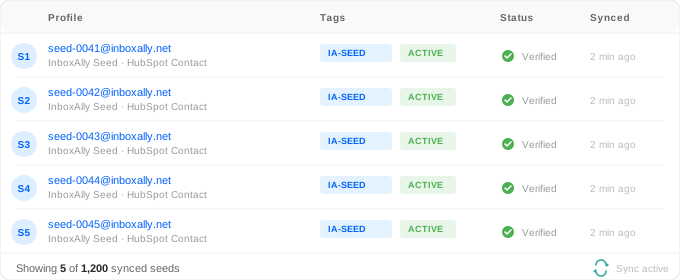
InboxAlly syncs seed email addresses directly into your HubSpot account. No manual imports or list management needed. Seeds are managed automatically and stay current with your InboxAlly allocation.
Recurring Revalidation for List Health
Email addresses go bad over time. InboxAlly’s recurring revalidation scans your HubSpot contact database on a configurable schedule – monthly, quarterly, or custom intervals – and flags contacts that are no longer valid. This prevents reputation damage from stale addresses.
Validation Rules and Manual Control
Configure which validation statuses count as “valid” for your use case. Trigger manual revalidation runs when you need immediate results. Full control over how aggressively InboxAlly filters your HubSpot contacts.
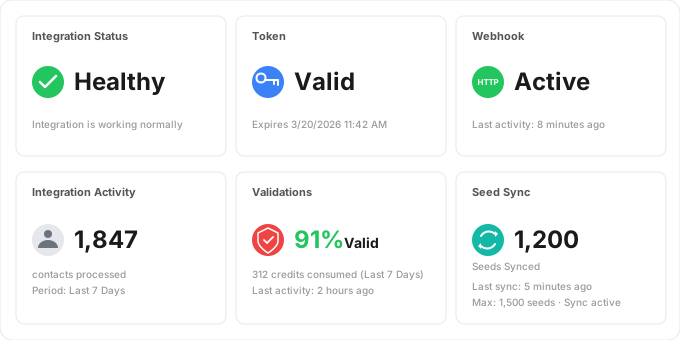
Real-time view of your seed sync status, validation metrics, and engagement signals.
How It Works: Connect, Sync, Improve
Setting up InboxAlly with HubSpot takes less than five minutes. The integration uses HubSpot’s secure OAuth flow – no API keys to manage, no technical configuration required.
Step 1: Connect Your HubSpot Account
In your InboxAlly dashboard, go to Integrations, select HubSpot, and click Connect. You’ll authorize InboxAlly through HubSpot’s OAuth flow. Select your HubSpot account and confirm the connection.
Step 2: Seeds and Validation Start Automatically
InboxAlly begins syncing seed addresses into your HubSpot lists and sets up webhook listeners for new contacts. The integration dashboard shows you real-time metrics on sync status, validation rates, and contact processing.
InboxAlly seeds appear as regular HubSpot contacts, receiving your marketing emails and sequences automatically.
Step 3: Your Deliverability Improves
As your HubSpot marketing emails and sequences send to InboxAlly seeds, those seeds generate positive engagement signals. Mailbox providers see consistent opens, reads, and clicks from your domain and start placing more of your emails in the inbox. Most users see measurable improvement within the first two weeks.
How InboxAlly Connects to HubSpot
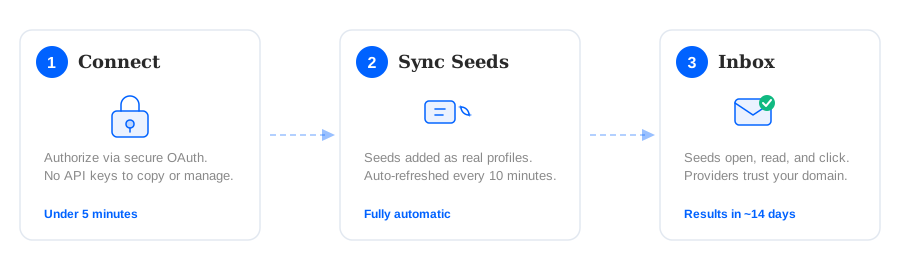
The InboxAlly-HubSpot integration follows a three-step process that runs automatically after initial setup.
InboxAlly connects to HubSpot, syncs seeds, validates contacts, and improves deliverability automatically.
1. Connect your HubSpot account through a secure OAuth authorization flow from the InboxAlly dashboard. 2. InboxAlly syncs seed email addresses into your HubSpot lists and sets up real-time webhook validation for new contacts. 3. Seeds receive your marketing emails and sequences, generating opens, reads, and clicks that train mailbox providers to trust your domain and place emails in the inbox.
Why InboxAlly, Not Other Warmup Tools?
Unlike generic email warmup services, InboxAlly syncs directly into your HubSpot account as real contacts. Seeds receive your actual marketing emails and sequences — not artificial test emails. This means mailbox providers see genuine engagement patterns tied to your real sending domain and content.
What HubSpot Users Say About InboxAlly
“Our HubSpot sequences were hitting spam for three straight weeks. 10 days after connecting InboxAlly, inbox placement jumped from 58% to 91%. Pipeline velocity increased by 34%.”
— Sarah Kim, VP of Marketing, B2B SaaS company (80K contacts)
“We install InboxAlly on every client HubSpot portal during onboarding. The webhook validation alone has caught thousands of bad addresses before they could damage sender reputation.”
— David Okonkwo, Email Operations Director, HubSpot agency partner
Frequently Asked Questions
Why are my HubSpot emails going to spam?
HubSpot emails land in spam when mailbox providers don’t trust your sending domain or the shared IP pool your emails come from. Common causes include sending to unengaged contacts, poor list hygiene, lack of domain authentication (SPF, DKIM, DMARC), and sudden changes in send volume. InboxAlly fixes the root cause by generating positive engagement signals that rebuild mailbox provider trust in your domain.
How do I improve HubSpot email deliverability?
Start by authenticating your domain, cleaning your contact lists, and segmenting by engagement level. For faster results, connect InboxAlly to your HubSpot account to generate automated seed engagement that directly improves how mailbox providers score your domain. Most users see inbox placement improve within one to two weeks.
Does HubSpot have built-in email warmup?
No. HubSpot does not include native email warmup tools. When you start sending from a new domain or significantly increase volume, HubSpot provides no automated way to build sender reputation gradually. InboxAlly fills this gap with continuous seed engagement that warms and maintains your domain reputation automatically.
Does InboxAlly work with HubSpot sequences and workflows?
Yes. InboxAlly seeds are synced into HubSpot as regular contacts, so they can receive emails from marketing campaigns, sales sequences, and automated workflows. Every email your HubSpot account sends to InboxAlly seeds generates positive engagement signals that improve your overall deliverability.
How long does it take to fix HubSpot deliverability?
Most InboxAlly users see measurable improvement within one to two weeks. The exact timeline depends on your current sender reputation, sending volume, and the severity of your deliverability issues. Domains with moderate problems often improve within days, while severely damaged reputations may take three to four weeks of consistent seed engagement.
Can InboxAlly help with HubSpot shared IP deliverability problems?
Yes. Since HubSpot uses shared IP pools, your IP reputation is partially outside your control. InboxAlly builds strong domain-level reputation through seed engagement, which increasingly outweighs IP reputation in how Gmail, Outlook, and Yahoo make placement decisions. This protects your deliverability even if other senders on your shared IP have poor practices.
How much does InboxAlly cost for HubSpot users?
InboxAlly pricing is based on the number of seed emails in your plan, not on which email platform you use. The HubSpot integration is included with every InboxAlly subscription at no additional cost. Visit inboxally.com/pricing for current plan details, or book a demo to discuss which plan fits your sending volume.
Other Integration Guides
Using another email platform? InboxAlly also integrates with Klaviyo to fix deliverability for e-commerce brands. Browse all available integrations on the InboxAlly hub.
Start Reaching the Inbox Today
Every day your HubSpot emails land in spam is a day of lost pipeline and missed engagement. InboxAlly connects to your HubSpot account in minutes and starts improving your deliverability immediately.